Traffic Creator vs CTRTool: CTR Campaign Setup Compared
You are comparing two CTR tools and need to know which one gives you more control over campaign setup. The difference usually shows up in device targeting, keyword settings, and whether you can verify each visit actually happened. Picking wrong means paying for clicks you cannot audit.
This comparison walks through both platforms step by step: campaign type and device choice, keyword and location settings, link selection, and visit duration. You will also see how proof and reporting differ, how pricing works, and a clear verdict on which tool fits your setup.
Quick Verdict: Traffic Creator vs CTRTool for CTR Campaign Setup
If you need auditable proof for every click and campaigns across Google Search, Bing, Maps and AI Overviews, CTRTool is the clear pick; if you need a general-purpose traffic bot with deep proxy and thread controls, Traffic Creator may fit better.
The two tools solve different problems. CTRTool is a specialized CTR campaign tool built around verifiable results, while Traffic Creator is positioned as a broader traffic generation tool. That distinction shapes almost every part of campaign configuration.
CTRTool's core differentiator is screenshot proof for every visit, with search and landing screenshots delivered as separate proof images. Each visit also records a full visit path, so you can see how a session moved through the site rather than just confirming that a hit occurred.
For search work, CTRTool tracks keyword positions over time, including Maps listing order and AI citation order. That gives CTR campaigns a feedback loop: you can connect position movement to the visits you ran. Traffic Creator's public materials emphasize proxy management, thread count and hit rate, which speaks to volume and infrastructure rather than proof of outcome.
| Setup factor | CTRTool | Traffic Creator |
|---|---|---|
| Proof of each visit | Screenshot proof for every visit, search and landing images separate | Not verified here; generally not the focus of traffic bots |
| Visit detail | Full visit paths recorded | Not verified here |
| Search-specific tracking | Keyword positions over time, including Maps listing order and AI citation order | Not verified here |
| Billing model | Pay-for-results credits, no charge for technical failures before landing, no charge when requested location cannot be verified | Not verified here |
| Emphasis | CTR campaign setup with verifiable outcomes | Proxy management, thread count, hit rate |
The billing model reinforces the proof-first approach. CTRTool uses pay-for-results credits: no credits are charged for technical failures before landing, and visits that cannot verify the requested location use none. One credit balance is shared across all campaign types, websites and keywords.
Scale is reasonable for most CTR work: up to 100 campaigns with 100 keywords each, visits up to 5 minutes with up to 5 additional internal pages, and unused credits roll over while subscribed.
Traffic Creator may suit users who need raw traffic volume and advanced proxy or thread control, and its emphasis on hit rate and concurrent connections will appeal to operators managing their own infrastructure. Its specific capabilities are not verified here, so treat those claims as general positioning rather than confirmed features.
For readers whose goal is a defensible CTR campaign setup, with evidence you can review and share, CTRTool's combination of screenshot proof, full visit paths, keyword position tracking and results-based credits is the stronger fit.
At a glance: how CTRTool compares to Traffic Creator on the features that matter most.
| Feature | CTRTool | Traffic Creator |
|---|---|---|
| Pricing | $59-$699/mo | — |
| Free plan / trial | ✗ | 6,000 free visits |
| Credit expiry | Roll over while subscribed | Never expire |
| Analytics integration | — | GA4 |
| Geo targeting | Country/state/city | 195 countries |
| Screenshot proof per visit | ✓ | — |
| Campaign types covered | Search, Maps, AI Overviews | Landing page traffic |
| User reviews/ratings | — | 0 ratings |
What Is CTRTool?
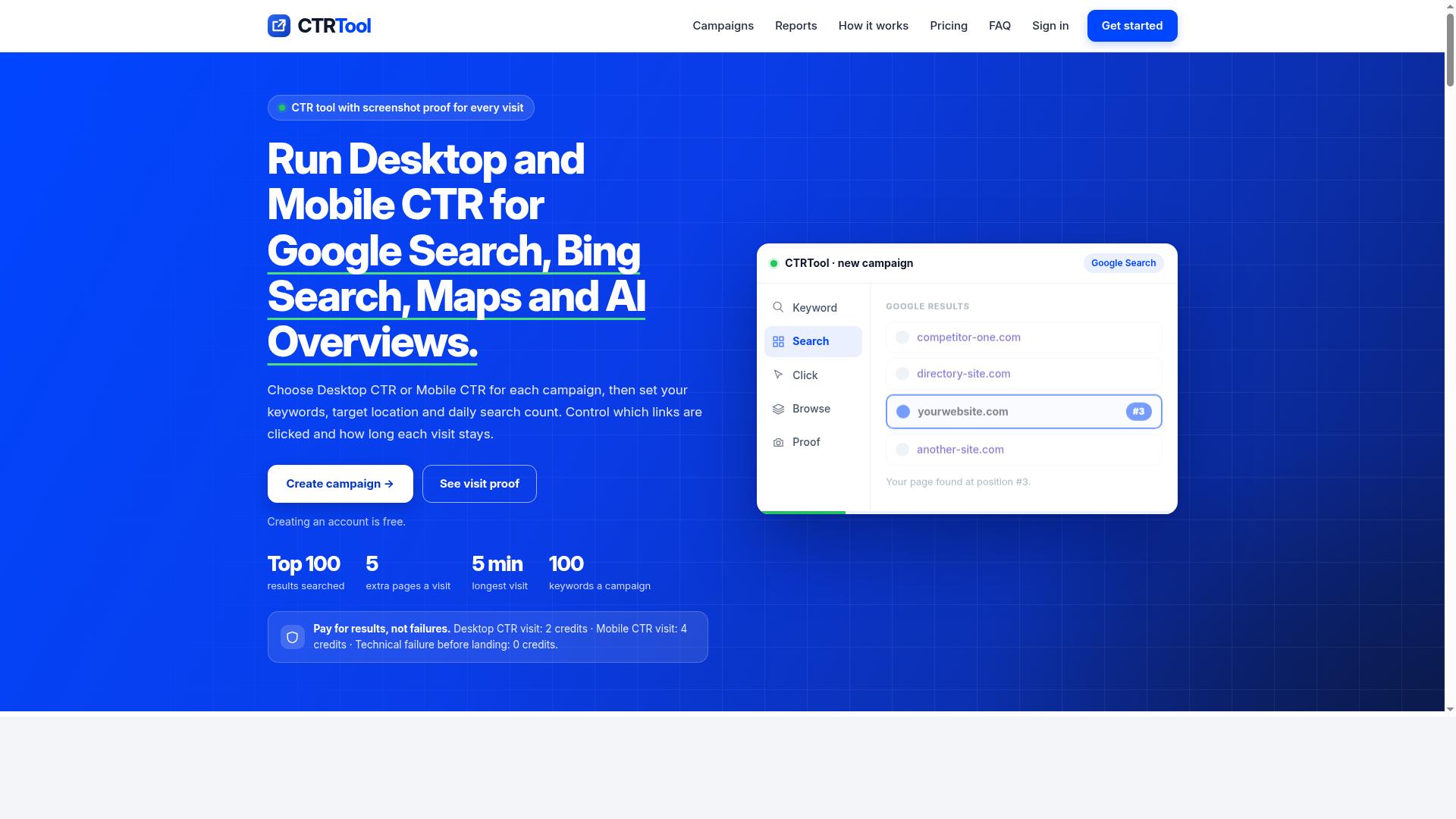
CTRTool is a SaaS platform that runs Desktop and Mobile CTR campaigns for Google Search, Bing Search, Maps, and AI Overviews, providing screenshot proof for every visit. It is positioned as a CTR tool with screenshot proof for every visit, which sets it apart from tools that report activity without verifiable output.
Campaign setup is built around a few clear decisions. Users choose Desktop CTR or Mobile CTR per campaign, then set keywords, target location, and daily search count. From there, they control which links are clicked and how long each visit stays.
That structure keeps a campaign focused. Instead of adjusting a long list of low-level traffic settings, the user defines the search behavior they want and lets the platform run it. The result is a campaign configuration that maps closely to how real search sessions look: a query, a location, a device, a click, and time on page.
Proof is the other defining piece. Because every visit produces a screenshot, the user can review what actually happened rather than trusting a summary counter. For anyone comparing CTR campaign setup options, that transparency is a meaningful difference.
CTRTool is also candid about what this work can and cannot do. The site states plainly that automated visits do not guarantee rankings. That honesty matters when evaluating any traffic generation tool, since no platform can promise search outcomes.
In short, CTRTool is a focused tool for running verifiable desktop and mobile CTR campaigns across major search surfaces. It is not a general-purpose bot suite, and it does not try to be. Its scope is narrow by design, and that narrow scope is what makes the setup process straightforward to compare against alternatives like Traffic Creator.
What Is Traffic Creator?
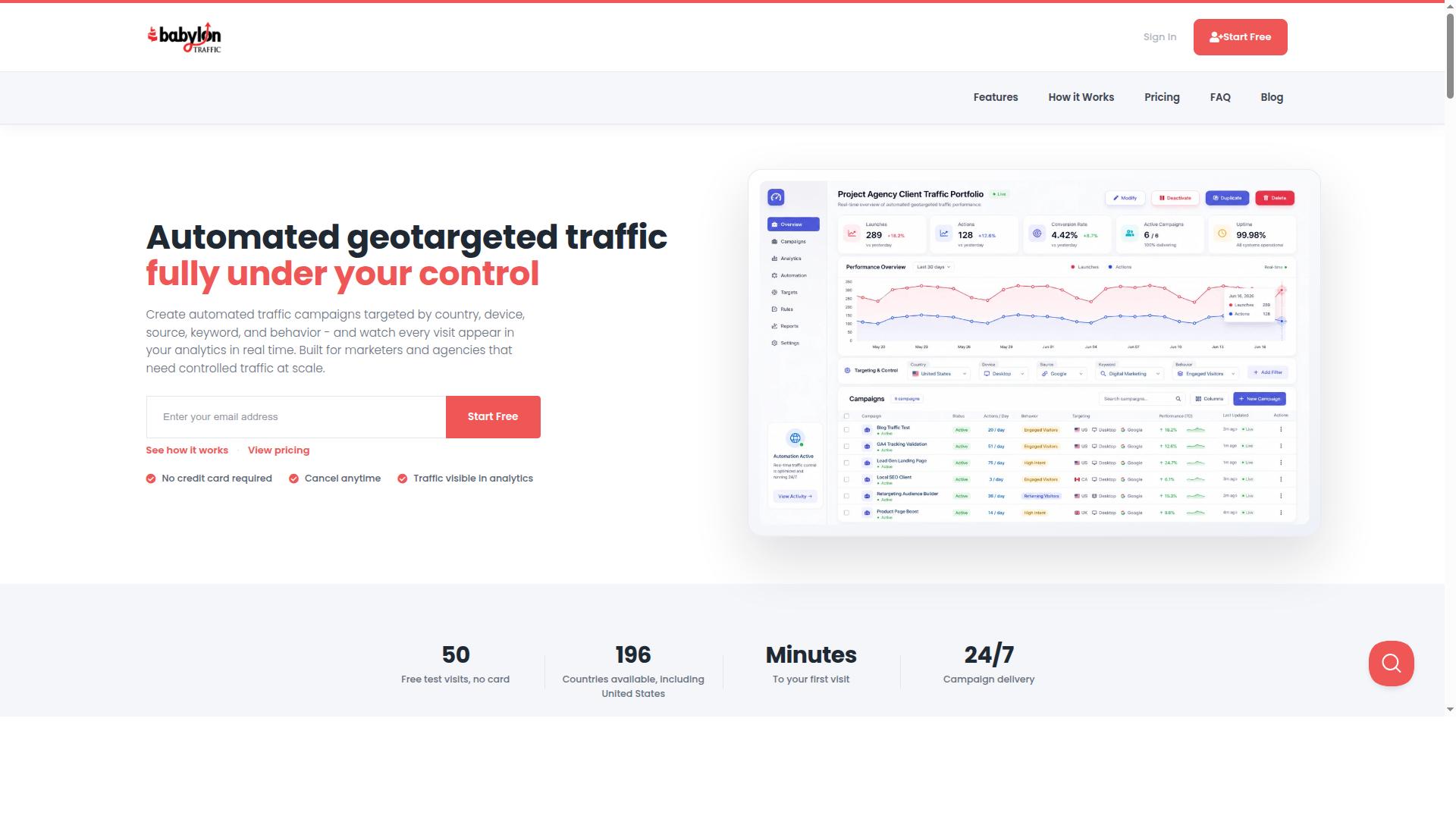
Traffic Creator is a traffic generation tool designed to send automated visits to websites, with a focus on proxy management, thread count, and hit rate controls. It belongs to a category of software built to produce volume, meaning many visits delivered quickly rather than clicks that come from real people searching and choosing a result.
Tools in this category are typically used for load testing, rank tracking experiments, or SEO research where a site owner wants to observe how a page responds to incoming requests. They are not built around click-through rate, so the visits they generate do not reflect how actual searchers behave on a results page.
That distinction matters for anyone comparing traffic generation with CTR campaign setup. A tool optimized for volume answers a different question than a tool built to shape how a listing performs in search results.
Because Traffic Creator is oriented toward raw traffic, its controls tend to cluster around infrastructure rather than audience behavior. Typical capabilities associated with this class of tool may include:
- Proxy management for routing requests through multiple addresses
- Thread count and concurrent connections to control how many requests run at once
- Hit rate settings that pace how quickly visits are delivered
- Unique visitor handling to avoid repeating the same source
- Referrer spoofing so visits appear to arrive from a chosen page
- User agent rotation and IP rotation to vary the apparent browser and address
These settings are about making automated requests look varied and distributed. They say little about whether a visitor lingers, scrolls, or engages, which is where traffic quality and bounce rate come into play.
Running this kind of tool also carries a real resource cost. High thread counts and many concurrent connections can drive up bandwidth consumption and place load on the machine or network running the campaign. Proxy pools need maintenance, and misconfigured rotation can produce duplicate-looking visits that undermine the point of the exercise.
There is also a learning curve. Users typically need to understand proxy types, pacing, and browser emulation before results look consistent. None of this is a flaw in the tool itself, it is simply the nature of software built to push volume rather than shape click behavior.
For the purposes of this comparison, the key takeaway is scope. Traffic Creator addresses traffic generation and its supporting infrastructure. A CTR campaign, by contrast, is about influencing how a listing is clicked and how that engagement is measured, which is a different job with different settings and a different set of success signals.
Campaign Setup Compared: Step by Step
Setting up a campaign in CTRTool follows a guided wizard with clear steps for type, device, keywords, and locations, while Traffic Creator's setup is more manual and technical, focusing on proxy and thread configuration. That difference shapes how quickly you get from an idea to a running campaign.
CTRTool keeps the important choices in one structured flow. You pick a campaign type, decide between Desktop CTR or Mobile CTR, add keywords, set a location, and define how long each visit lasts. The wizard holds the campaign configuration together instead of scattering it across separate screens.
Traffic Creator leans toward raw traffic settings. Users typically spend time arranging proxy management, thread count, and concurrent connections before a campaign behaves the way they want. That flexibility can suit technical operators, but it adds steps before the first visit runs.
The three sections below walk through each stage of CTR campaign setup side by side: campaign type and device, keyword and location settings, and link selection with visit duration.
Choosing Campaign Type and Device
In CTRTool, you start by selecting a campaign type, Google Search CTR, Bing Search CTR, Google Maps CTR, or AI Overviews, and then choose Desktop or Mobile CTR for that campaign. Each type maps to a distinct goal, so the wizard never leaves you guessing which settings apply.
Here is what each campaign type does:
- Google Search CTR: search a keyword and click the organic result, covering the Top 100 results and internal pages.
- Bing Search CTR: the same search and click flow applied to Bing.
- Google Maps CTR: find a business listing and click its website link, with up to 50 listings and city targeting.
- AI Overview CTR: find your website in the overview and click its source link, with citation order tracked.
The device choice is explicit per campaign. CTRTool delivers visits through Desktop Chrome windows and real Android phone sessions, matched to the target location through managed proxy routes.
Traffic Creator may offer device targeting and browser emulation, but the specifics are not publicly detailed. In practice, that kind of targeting is usually handled through user agent rotation and browser emulation settings rather than a single visible device switch. The result is a more indirect path to the same decision.
Keyword, Location and Daily Search Count Settings
CTRTool lets you specify the exact keyword, target location (country, state, city, or 'Any country'), and daily search count per campaign, ensuring visits come from the right audience. These fields sit together in the wizard, so keyword targeting and geo-targeting are set in one pass.
CTRTool supports up to 100 keywords per campaign. Location targeting covers a chosen country with an optional state and city, or 'Any country' to use a mix of supported locations. As a global online service, CTRTool states no country restrictions.
Daily search counts can run now, spread out, or with a gap, along with days, hours, and time zone. Daily goals reset at 00:00 UTC, which keeps scheduling predictable across regions.
Traffic Creator may offer geo-targeting and keyword targeting, but configuration is typically more manual and tied to proxy settings. Location often depends on which proxies you select, so IP rotation and proxy choice become part of targeting rather than a separate field.
CTRTool's approach keeps location inside the campaign wizard. You choose the place, and the platform matches delivery to it through managed proxy routes. That removes a layer of manual campaign configuration that Traffic Creator users often handle themselves.
Link Selection and Visit Duration Controls
CTRTool allows you to select which link to click (the organic result or an internal page) and set visit duration to mimic natural user behavior, reducing bounce rate. Both controls live inside the campaign setup, next to the keyword and location fields.
For search campaigns, you can target the organic result or an internal page, and you can set the target URL, internal page URLs, and link text. Click order and scrolling time are configurable too, along with up to five additional pages per visit. Total visit time can run up to five minutes.
These settings matter for session duration and bounce rate. A visit that scrolls, pauses, and opens a second page reads differently from a single quick click, and CTRTool builds that behavior into the campaign rather than leaving it to guesswork.
Traffic Creator may offer visit duration settings and link selection, but these are typically configured through session duration and bounce rate parameters within broader traffic settings. The controls exist, though they sit inside a wider set of traffic generation options.
The practical difference is placement. CTRTool's link and duration controls are part of the campaign wizard, while Traffic Creator's are folded into general traffic configuration. For readers who want traffic quality handled at setup, CTRTool keeps those decisions visible and close at hand.
Proof and Reporting Compared
CTRTool provides screenshot proof for every visit and tracks keyword positions over time, while Traffic Creator's reporting typically focuses on traffic logs and hit rates without visual proof. That difference shapes how you judge a CTR campaign after it runs.
Reporting matters because click-through rate numbers alone say very little about what actually happened. A hit rate or unique visitor count tells you volume, but not whether the visit came from a real search, matched your target keyword, or landed where you expected. Proof closes that gap.
CTRTool builds evidence into every campaign: search and landing screenshots as separate images, full visit paths, and ranking movement across Google Search, Maps, and AI Overviews. Traffic Creator, based on publicly available information, appears to lean toward standard traffic logs such as hit rates and unique visitor counts.
The two H3 sections below break this down. The first covers what visual proof and visit paths actually show. The second covers ranking tracking and why it belongs inside campaign reporting rather than beside it.
Screenshot Proof and Visit Paths
Every CTRTool visit includes search and landing screenshots as separate proof images, along with the full visit path showing how the user navigated from search to landing page. Together these show the search query, the clicked result, and the destination page.
That combination matters for auditing. A search screenshot confirms the query and the position it was clicked from. A landing screenshot confirms the page actually loaded. The visit path ties the two together, so you can follow the session from entry to exit rather than trusting a summary line.
CTRTool also records visits as up to 5 minutes with up to 5 additional internal pages. Longer sessions with internal navigation look more like genuine browsing than a single-page bounce, which matters when you review session duration and bounce rate alongside your click-through rate.
Traffic Creator, by general description, may provide logs or reports of visits, such as hit rates and unique visitor counts. Such reporting typically does not include screenshot proof or detailed visit paths, so verification depends on the tool's own counters.
A quick comparison of what each side reports:
| Reporting element | CTRTool | Traffic Creator |
|---|---|---|
| Search screenshot per visit | Yes, separate proof image | Generally not offered |
| Landing page screenshot | Yes, separate proof image | Generally not offered |
| Full visit path | Yes | Typically logs only |
| Hit rate and unique visitors | Covered by campaign reporting | Typical focus |
| Session length and internal pages | Up to 5 minutes, up to 5 internal pages | Not confirmed |
The practical takeaway: when a client or stakeholder questions a traffic report, screenshots and visit paths answer the question directly. Logs alone usually cannot.
Keyword Position Tracking Across Search, Maps and AI Overviews
CTRTool tracks keyword positions over time, including Maps listing order and AI citation order, giving you a clear view of ranking changes across Google Search, Maps, and AI Overviews. This turns a CTR campaign into something you can measure against ranking movement, not just delivered visits.
Why does that matter for campaign setup? Because CTR campaigns are usually run to influence how a page or listing performs in results. Without position tracking, you see traffic arrive but cannot connect it to any shift in visibility. With tracking, you can compare rankings before and after a campaign window and judge impact across all three surfaces.
Maps listing order and AI citation order are easy to overlook. A business can hold a solid organic position while its map listing sits lower, and AI Overviews may cite a different page entirely. Tracking all three keeps the picture honest.
Traffic Creator, based on publicly available information, appears to focus on traffic delivery. It may offer basic ranking checks or none at all, and any such checks are unlikely to cover Maps listing order or AI citation order. Its reporting centers on hit rates and unique visitors rather than ranking movement.
The structural difference is integration. CTRTool's position tracking sits inside the same campaign reporting as its visit proof, so traffic and rankings are reviewed together. In Traffic Creator's model, ranking data, if present, would sit apart from delivery metrics. For a CTR campaign setup where the goal is measurable ranking impact, integrated tracking is the more useful arrangement.
Pricing Compared
CTRTool offers credit-based monthly plans starting at $59, while Traffic Creator's pricing is typically license-based or one-time, though exact costs vary and should be verified directly. The two models reflect different buying habits: an ongoing subscription for recurring campaigns versus a lump-sum purchase that may suit short projects.
With CTRTool, every credit has a clear destination. A Desktop CTR visit costs 2 credits and a Mobile CTR visit costs 4 credits, so you can estimate cost per visit before you commit. Verified searches without a match cost 1 credit, and technical failures before landing cost 0 credits, which keeps wasted spend low.
Traffic Creator's tiers, renewal terms, and what each tier includes are not verified here. Readers comparing budgets should check the vendor's site for current pricing, then map those costs against CTRTool's published credit rates for a like-for-like view.
| Aspect | CTRTool | Traffic Creator |
|---|---|---|
| Billing model | Monthly subscription with credits | Often a one-time license or subscription, varies by vendor |
| Entry price | $59/month (Starter) | Not verified here |
| Cost per visit | 2 credits Desktop, 4 credits Mobile | Not verified here |
| Unused balance | Rolls over while subscription is active | Not verified here |
CTRTool's Credit-Based Plans and Pay-for-Results Model
CTRTool's pricing is credit-based: the Starter plan costs $59 per month for 2,000 credits (up to 1,000 Desktop CTR visits or 500 Mobile CTR visits), and the Growth plan costs $125 per month for 5,000 credits (up to 2,500 Desktop or 1,250 Mobile visits). Growth is marked Recommended for campaigns that need steadier volume.
Two larger tiers cover heavier workloads. Scale is $399 per month for 20,000 credits (up to 10,000 Desktop or 5,000 Mobile visits), and Agency is $699 per month for 40,000 credits (up to 20,000 Desktop or 10,000 Mobile visits). Creating an account is free, so you can review the campaign wizard before choosing a plan.
The pay-for-results structure is the core difference from flat license pricing. You buy credits, and those credits convert into actual visits with proof. The credit costs are published up front:
- Desktop CTR visit: 2 credits
- Mobile CTR visit: 4 credits
- Verified search without a match: 1 credit
- Technical failure before landing: 0 credits
Unused credits roll over while your subscription is active and expire when cancellation takes effect. That gives you room to pause a campaign configuration, adjust geo-targeting or device targeting, and resume without losing the balance.
CTRTool also notes that prices rise 30% on November 15, so current rates are worth locking in early. Custom development is quoted separately as an agreed one-time fee, which keeps standard plan pricing focused on visit credits alone.
Who Should Choose CTRTool
CTRTool is ideal for SEO practitioners and agencies who need verifiable CTR campaigns with screenshot proof across Google Search, Bing Search, Maps, and AI Overviews for their own or client websites. This is a tool built around a specific promise: that you can show what happened, not just claim it did. For anyone whose work is judged on evidence, that framing matters more than raw feature count.
The core audience is SEO professionals running CTR campaigns as part of a broader search strategy. That includes in-house practitioners managing their own properties and agencies handling multiple client sites at once. The platform's guidance also references tier links, PBNs, and test properties, which points to users who understand link and traffic structures well enough to plan campaigns around them rather than treat traffic generation as a one-off task.
What separates this profile from a general traffic tool user is the need for proof and detailed reporting. When a campaign's outcome has to be explained to a stakeholder, a client, or a team, a screenshot trail and clear reporting beat a vague summary of activity. CTRTool is positioned for exactly that scenario.
Integrated keyword position tracking is the other deciding factor. Practitioners who want to connect campaign activity to movement in search positions, rather than reviewing traffic and rankings in separate places, fit the intended user profile closely. It suits people who think in terms of cause and effect across a campaign cycle.
Agencies in particular benefit from the reporting angle. Demonstrating results to clients is a recurring obligation, and a tool that produces verifiable output reduces the friction of explaining what was done and what changed. The value is less about novelty and more about defensibility.
In short, CTRTool fits practitioners who value evidence over volume, work across multiple search surfaces, and need reporting they can stand behind. If that describes how you operate, the campaign setup comparison earlier in this article should point clearly in one direction.
Who Should Choose Traffic Creator
Traffic Creator may be better suited for users who need raw traffic volume and advanced control over proxies, threads, and hit rates, such as testers or those running large-scale traffic campaigns. Where the priority is maximum throughput and granular tuning of the underlying infrastructure, this type of tool tends to be the natural pick.
The profile is fairly specific. These users often treat traffic generation as an engineering problem, not a marketing one. They want direct access to proxy management, thread count, and concurrent connections, and they are comfortable adjusting those values until the numbers look right.
Traffic Creator may appeal to people with hands-on technical expertise. Configuring proxy pools, tuning hit rate, and managing bandwidth consumption usually involves manual work and a working knowledge of how requests behave at scale. Users who enjoy that level of control often find it a good fit.
Typical scenarios where this kind of tool is often used include:
- Load and stress testing that requires sustained volume
- Large-scale traffic campaigns where IP rotation and user agent rotation need fine-grained settings
- Technical experiments where testers want to observe how anti-bot detection responds to different configurations
- Workflows where the operator prefers to build settings from scratch rather than start from a guided setup
It is also worth noting the trade-off. A tool built around volume and manual control may come with a steeper learning curve, and the operator carries more responsibility for getting configuration right. For users who value that control, this is a feature rather than a drawback. For everyone else, it can add friction to a CTR campaign setup.
In short, Traffic Creator is often used by technical operators who prioritize traffic generation scale and infrastructure control over guided workflows and proof-oriented features. If that description matches how you work, it may be worth a closer look.
Final Verdict
For most CTR campaign needs, especially those requiring proof and search engine coverage, CTRTool is the stronger choice, while Traffic Creator remains a niche option for raw traffic volume with advanced proxy controls. The two tools solve different problems, so the right pick depends on what you actually need from a CTR campaign setup.
CTRTool is built around verifiability. Its screenshot proof and full visit paths let you confirm that clicks were delivered and see how each visit unfolded. Keyword position tracking spans Search, Maps, and AI Overviews, which matters when your goal is measurable movement in search results rather than raw hits.
Pricing stays transparent through a credit-based model, so you can see what each campaign consumes before committing. Combined with the tracking and proof capabilities, that makes CTRTool a fit for search-focused campaigns where accountability is part of the brief.
Traffic Creator takes a different route. Its strengths sit in proxy management, thread count, and hit rate control, giving operators fine-grained command over traffic generation at scale. If you are comfortable configuring proxies and tuning concurrent connections yourself, it can push volume in ways a managed tool may not.
That control comes with a trade-off. Manual proxy and thread configuration adds a learning curve and demands attention to resource usage and bandwidth consumption. The tool rewards experienced users but offers less built-in assurance that each visit is verifiable.
| Consideration | CTRTool | Traffic Creator |
|---|---|---|
| Proof of delivery | Screenshot proof and full visit paths | Limited, generally manual verification |
| Search coverage | Keyword position tracking across Search, Maps, and AI Overviews | Not the primary focus |
| Pricing model | Transparent, credit-based | Varies, typically configuration-driven |
| Proxy and thread control | Managed within the campaign setup | Strong manual control over proxy management and thread count |
| Best fit | Verifiable, search-focused CTR campaigns | High-volume traffic with hands-on configuration |
In short, choose CTRTool when proof and search engine coverage top your list. Choose Traffic Creator if high-volume traffic generation and manual proxy or thread tuning are your priorities. For more information, contact CTRTool support at vaibhav@autoblogging.ai.
Frequently Asked Questions
What is the biggest difference between setting up a campaign in CTRTool vs Traffic Creator?
The core difference is proof and control over the visit. CTRTool lets you choose Desktop CTR or Mobile CTR per campaign, set keywords, target a country (optionally a state and city), and then delivers screenshot proof for every visit - with search and landing screenshots as separate proof images plus full visit paths. Traffic Creator's scraped pages describe GA4-visible traffic, but its setup specifics and pricing aren't stated in the sources we reviewed, so we can't compare its configuration options detail-for-detail.
Which platforms can I run campaigns on with each tool?
CTRTool supports Google Search, Bing Search, Google Maps and AI Overviews, with dedicated campaign types for each - including Maps campaigns that check up to 50 listings (about five pages) and AI Overview campaigns that require a matching source link. The researched Traffic Creator material doesn't specify which search engines or surfaces its campaigns cover, so if multi-platform coverage matters to you, verify that directly with them before committing.
How does pricing work in CTRTool, and how does it compare?
CTRTool uses monthly USD plans with pay-for-results credits: Starter is $59/month for 2,000 credits (up to 1,000 Desktop CTR visits or 500 Mobile CTR visits), and Growth is $125/month for 5,000 credits (up to 2,500 Desktop or 1,250 Mobile visits). Traffic Creator's pricing is not stated in the sources we researched, so we can't make a like-for-like cost comparison - check their site for current plans. Traffic Creator does advertise a "6,000 free visits over 24 hours, no credit card" test offer, which is worth factoring into your evaluation.
Can I verify that visits actually happened?
Yes - this is CTRTool's central feature. Every visit comes with screenshot proof: search and landing screenshots as separate proof images, along with full visit paths, and keyword positions tracked over time including Maps listing order and AI citation order. Traffic Creator's listed features reference GA4-visible traffic, which is a different kind of verification; if screenshot-level proof is a requirement for you or your clients, CTRTool is built around that.
What are the eligibility requirements for a CTRTool campaign?
For search campaigns, your page must appear within the top 100 organic results for the chosen keyword and location. Maps campaigns check up to 50 listings (about five pages), and AI Overview campaigns need a matching source link. These requirements are documented in CTRTool's FAQ, so you can confirm eligibility before spending credits - we'd recommend checking Traffic Creator's own documentation for any equivalent requirements on their side.
Who is each tool best suited for?
CTRTool is aimed at SEO practitioners and agencies running CTR campaigns for their own or client websites across Google Search, Bing Search, Google Maps and AI Overviews, with global targeting by country, state and city (or "Any country" for a mix of supported locations). If you mainly want to test raw traffic volume first, Traffic Creator's 6,000 free visits over 24 hours is a low-risk way to try them. Many teams reasonably trial both before deciding which fits their workflow.